Getting Started and Navigation Questions
These concise answers use the same wording captured during product exploration. Follow the linked guide when you need fuller context or step-by-step instructions.
Why is my card library empty?
A new browser profile intentionally starts with no saved cards.
Can I start with example cards?
The empty Cards view links to a free sample .hqcc library.
What are the main areas of the app?
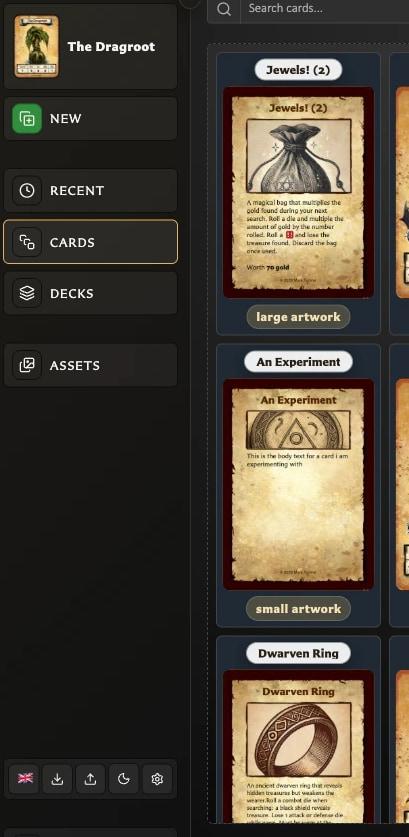
The main areas are the Card Editor, Cards, Decks, Assets, Settings, and the controls for backups, language, and appearance.
What keyboard shortcuts can I use to navigate around the app?
Press bare R, C, D, A, Q, or N to open Recent, Cards, Decks, Assets, Settings, or New Card; press S to focus the current screen's primary search when available.
When are keyboard shortcuts available?
Shortcuts pause while you are typing, using modifier keys, holding a key down, or working in an open app window.
What is available in the left navigation?
The left navigation combines the current-card shortcut, New, Recent, Cards, Decks, Assets, quick language/backup/theme/settings controls, and the download or update action.
How do I return to the card currently open in the editor?
Choose the current card's thumbnail and title at the top of the navigation to return to it from another workspace.
How do I start a new card from another workspace?
Choose New from any workspace to open the template picker; closing it leaves the current card unchanged.
How do the main navigation destinations differ?
Recent reopens viewed cards, Cards manages the library, Decks manages deck projects, and Assets manages reusable images.
Why will the navigation not expand?
At widths of 1280 pixels or less, automatic compact mode overrides the manual state, so Expand navigation cannot expand the bar until the window is wider.
What do the small controls at the bottom of the navigation do?
The bottom strip provides Language, Export library, Import library, Theme, and Settings without leaving the current workspace.
Where can I see the running app version and app type?
The footer links the running version to its matching release and identifies whether you are using the web or downloaded app.
How do I get a downloadable copy of the app?
Choose Get the app to open the HeroQuest Card Creator page on itch.io and obtain the downloadable version.
What is the difference between Get the app and Check for updates?
Get the app is acquisition wording for hosted copies; Check for updates? appears for downloaded or directly opened local copies and links to the current itch download.
How does the app tell me a newer version is available?
A supported local build shows a header notice naming the newer version and links to itch; npm builds also offer an npm link.
Which app copies perform automatic update checks?
Download builds check published GitHub releases, npm builds check the npm package, and itch-hosted or unrecognized builds do not perform remote checks.
What happens to update checking while I am offline?
No new check runs while offline; a previously confirmed update can remain visible until connectivity returns.
How do I run the downloaded app?
Extract the bundle, then open index.html or run the included macOS, Windows, or shell server launcher.
Should I open index.html or use the bundled server?
Direct file opening is simplest, while the bundled local server is the more reliable browser experience; each launch method can have separate stored data.
What does Desktop optimized mean?
The non-blocking notice means the app may partly work on that device, but desktop browsers and wider windows are the supported, easier editing experience.
How do I find the Collections panel on a narrow screen?
Use the collections-panel control to open Collections as a drawer on narrow screens or expand it on wider screens.
Why does a shortcut do nothing while I am typing?
Letter shortcuts pause while focus is in a text, number, multiline, selection, or other editable field so typing remains ordinary input.
Why do navigation shortcuts stop while an app window is open?
Global shortcuts pause while a foreground app window such as Recent, Settings, or Choose a template is open.
Why does a letter shortcut not work with Ctrl, Cmd, Alt, or Shift?
The main app shortcuts are bare letters and deliberately reject Ctrl, Cmd, Alt, or Shift; only the separate template-picker combination uses modifiers.
Are keyboard shortcuts different on macOS and Windows?
Bare letters are the same on macOS and Windows; the alternate template combination is labelled Cmd on macOS and Meta elsewhere.
Why does S not focus search?
S works only where a main browse search exists and is not already suppressed by typing or an open app window.
Why does holding a shortcut key not repeat the action?
Held-key repeat signals are ignored; release the key and press it again to repeat the action deliberately.
Is there another shortcut for opening Choose a template?
Cmd+Shift+Y on macOS, or Meta+Shift+Y elsewhere, opens Choose a template; bare N opens the same window more simply.