Fix Settings Problems
Start with the symptom that matches what you see.
My change disappeared when I changed category
Export Settings and Stat Label Overrides can contain unsaved edits. When Discard changes? appears:
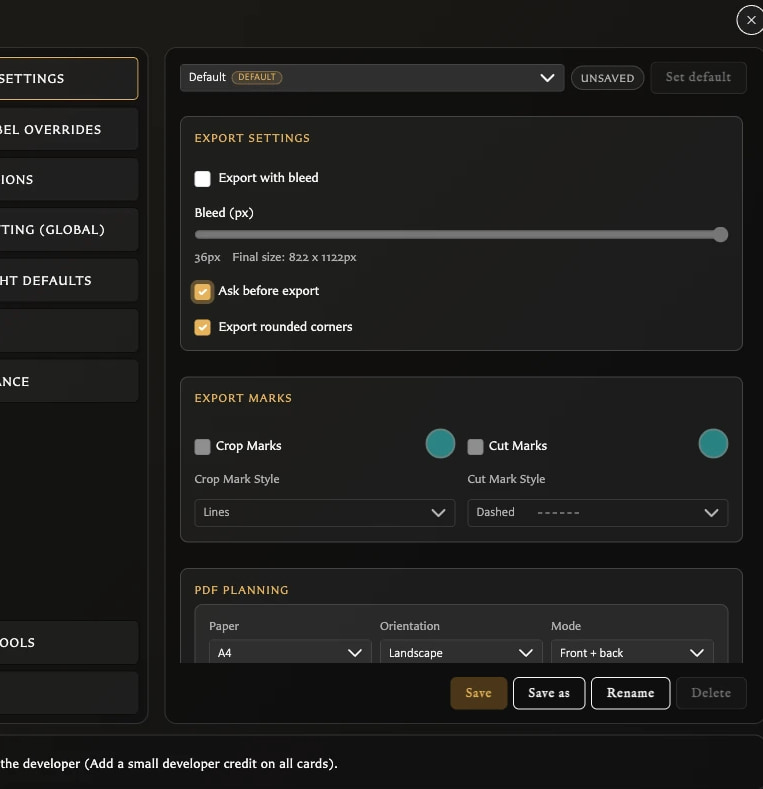
- Choose Cancel to return to the edited panel.
- Choose Save to keep the change and continue.
- Choose Discard to remove the unsaved change.
If you already chose Discard, repeat the change and choose Save before leaving the panel.
Most other Settings controls apply immediately and do not expose a separate Save button.
Save is disabled
In Export Settings, Save is disabled until the selected profile differs from its saved values. A disabled button usually means there is nothing new to save.
In Stat Label Overrides, enter or clear wording, choose whether overrides are enabled, then use the panel's Save button.
Bleed, marks, colour, or style is disabled
- Turn on Export with bleed before changing bleed amount, Crop Marks, or Cut Marks.
- Turn on Crop Marks or Cut Marks before changing that mark's colour or style.
- Turn bleed off if you want Export rounded corners.
These dependencies prevent combinations that the exporter does not use together.
Set default or Delete is disabled
Save or discard profile edits first. The active default cannot be set as default again or deleted. Select another saved profile and make it the default before deleting the old one.
The app also keeps at least one profile, so Delete is unavailable when only one remains.
I cannot enable automatic asset classification
Automatic asset classification is unavailable in Safari. The Assets setting is disabled there, but you can still classify individual images manually in the Assets inspector.
The current language is missing from the language menu
This is intentional. The active language is shown by the flag on the Language button and omitted from the list. To return to English, open the same flag menu and choose English beside the UK flag.
Debug Tools looks temporary or out of date
Debug Tools is a diagnostic category and may appear or disappear between builds. In v0.8.0 its notice still refers to version 0.5.x, so that notice is stale. Do not use Debug Tools as a guide to the app's current release status.
Avoid Clear asset classification unless you deliberately want to remove every automatic and manual asset-kind classification. The action is destructive.
My settings need to move to another browser
Create a .hqcc library backup and import it in the other browser profile to move export profiles, stat labels, copyright defaults, and saved border colours with the library. Personal preferences such as language, theme, collection display, text fitting, numeral styling, and developer credit must be chosen again in the destination. Import replaces the destination library rather than merging it, so read Back Up and Restore Your Library first.