Change Language and Appearance
Language changes the wording used by the app. Theme changes the app interface between Light, Dark, or the system preference. Neither action changes your saved cards, collections, decks, or assets.
Change the app language
- Choose Language in the left navigation. The current choice is represented by its flag.
- Choose the language you want.
- The app updates its visible interface immediately.
The current language is omitted from the menu. This leaves the other choices available and uses the button flag to show the active choice.
The available languages in v0.8.0 are:
- English
- Czech
- Danish
- German
- Spanish
- French
- Italian
- Hungarian
- Dutch
- Norwegian Bokmal
- Polish
- Portuguese
- Brazilian Portuguese
- Finnish
- Swedish
- Greek
- Russian
Switch back to English
If the app is currently in another language:
- Find the flag button in the same left-navigation position.
- Open it.
- Choose English beside the UK flag.
The language names remain written in their own languages, which helps you recognize English even when the surrounding interface has changed.
Change theme quickly
- Choose Theme in the left navigation.
- Choose Light, Dark, or Use system preference.
The choice applies immediately. Use system preference follows the operating-system or browser setting.
Use the full Appearance settings
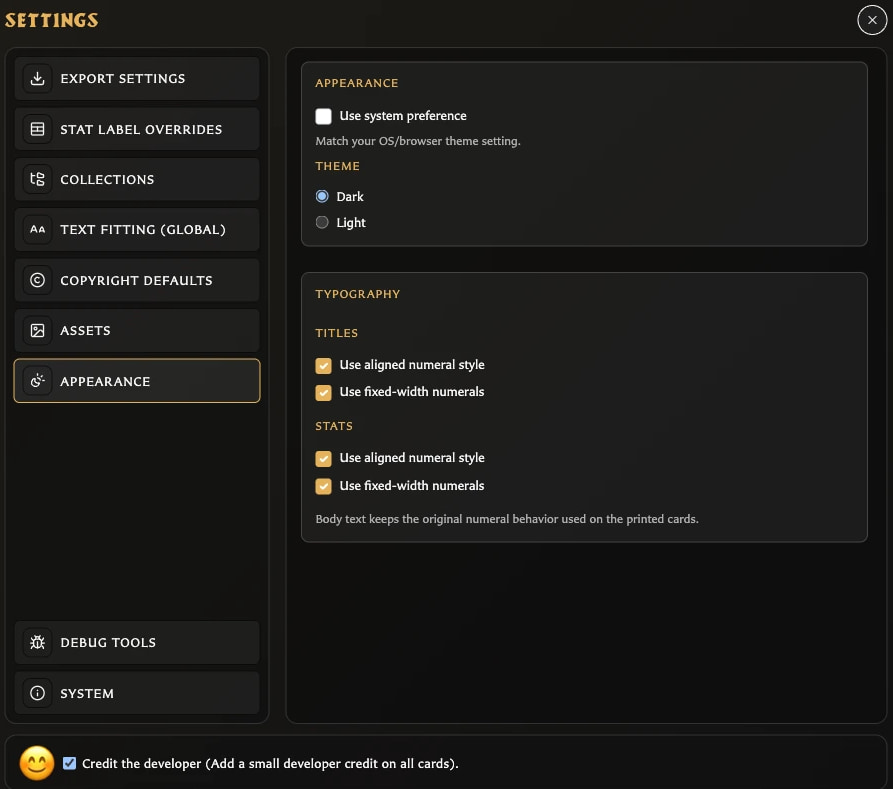
Open Settings > Appearance when you also want to configure numeral styling. In addition to the same theme choices, Titles and Stats each offer aligned and fixed-width numeral styles.
These options change how numbers are drawn in those card areas. Body text keeps its existing printed-card numeral behavior.